Tutorials, tips, tricks

Good article on CSS Flexible Box Layout Module from SmashingMag

CSS3 Flexible Box Layout Explained …This is invaluable for flexible layouts, Because it means that your padding, margin and border values will always be honored; the browser will simply change the width of the elements until they fit the parent. If the parent changes in size, so will the flexible boxes within it… W3C working draft

Posted in Blog, Tutorials, tips, tricks | Tagged , , | Leave a comment

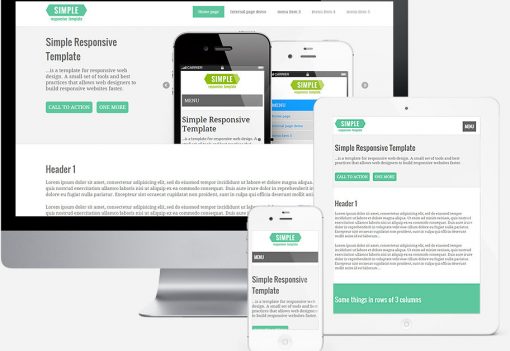
Yet another boilerplate for responsive (mobile) web design. YAMB.


YAMB   is a small set of tools and best practices that allow web designers to build responsive websites faster.
YAMB includes features that are requested by the clients all the time:

  • Fluid grid.
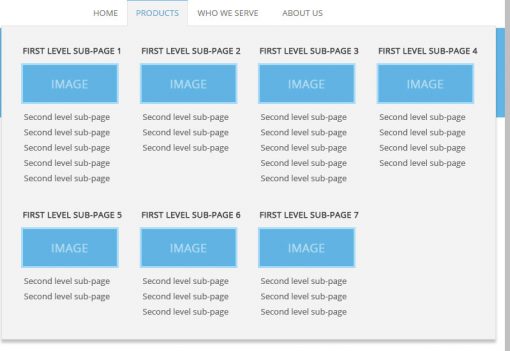
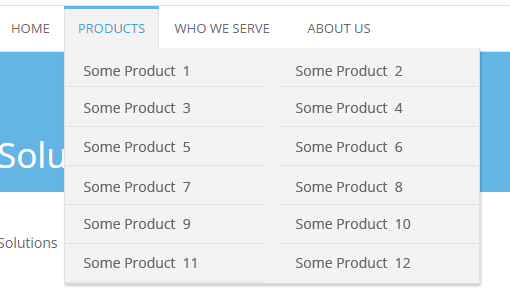
  • Drop-down menu with possibility of unlimited sub-levels or/and mega subs.
  • For small screens drop-down menu is automatically converted into select box.
  • Responsive image slideshow with captions.

Read more

Posted in Blog, Tutorials, tips, tricks | Tagged , , , , | 29 Comments

Screen ruler with 5px step for quick mobile / desktop prototyping and resolution testing

I have made a super-simplistic “tool” which helps you resize your browser to any width x height in pixels (range 2580px x 1650px). What’s the use of it? Gives you total control: resize to ANY resolution you want, not just presets. You can test the document you’re coding locally on your computer, without even having it online. Easy-peasy Enjoy: Screen Ruler

Posted in Blog, Tutorials, tips, tricks | Tagged , , | Leave a comment

Quick web design tip. Mind your @media queries while coding WP child themes

New WordPress default theme, Twenty Eleven, is responsive. Which makes it really awesome:). Don’t forget about this while writing child themes. Quick tips to save you some time and head scratching (“doh, why is it happening on mobile now?” kind): Copy at least @media (max-width: 800px){} into child theme’s CSS file As soon as you override any structural element’s width, don’t forget to go and … Read more

Posted in Blog, Tutorials, tips, tricks | Tagged , | Leave a comment

How to create glossy gradient menu bar in PhotoShop and then recreate it only with CSS3 and HTML5 (no images)

This tutorial consists of two parts. First one explains how to make glossy red menu bar (smartphone style) in PhotoShop. Second part explains how to recreate this bar in CSS3 without using any background or border images. The tutorial is for people who are regular users of PhotoShop and are on friendly terms with CSS3. But if you  have no idea what’s CSS3, or how … Read more

Posted in Blog, Tutorials, tips, tricks | Tagged | Leave a comment

Sortable design portfolio with WordPress 3.0, tags and jQuery

If you have many design projects, it is good to let your clients sort them by some criteria like type, industry etc. This tutorial tells you how to build sortable portfolio like PROWEBDESIGN’s. We will also cover how to optionally add jQuery animation effects to the sorting script. PROWEBDESIGN portfolio is made with WordPress 3.0.3 and is built upon Twenty Ten theme, so this is … Read more

Posted in Blog, Tutorials, tips, tricks | Tagged , | 10 Comments

Designing websites with scope in mind (or Why PROWEBDESIGN got its version #6)

What to consider, when you design a portfolio site for yourself? In one word – the SCOPE. The scope outlines the general aims and goals of any project. So, what is the scope of designer’s portfolio? WHAT TO KEEP IN MIND WHEN DESIGNING YOUR PORTFOLIO WEBSITE THE “HUMAN FACTOR” How new are you to the design? How large is your portfolio? Read more

Posted in Blog, Tutorials, tips, tricks | Tagged , , , | Leave a comment