YAMB v.2 tutorial and download page
Well, actually it’s 2 in 1 (oh, how we love this stuff!) – a template (boilerplate) and a short tutorial to get you started with mobile web design rocket fast.
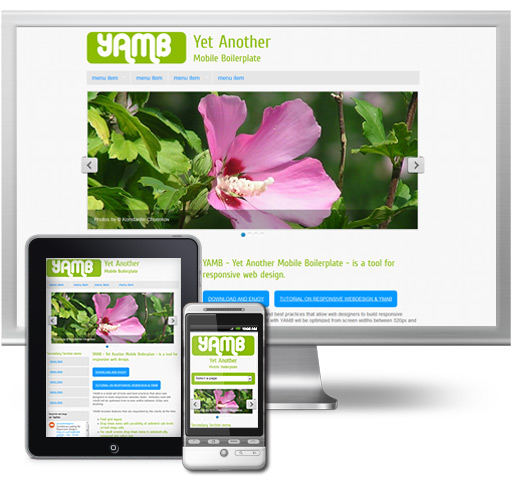
The Boilerplate. YAMB is a small set of tools and best practices that allow web designers to build responsive websites faster.
DOWNLAOD YAMB SOURCE FILES. || VIEW YAMB DEMO.
YAMB includes features that are requested by the clients all the time:
- Fluid grid.
- Drop-down menu with possibility of unlimited sub-levels.
- For small screens drop-down menu is automatically converted into select box.
- Responsive image slideshow with captions.
DISCLAMER: We do not aspire to produce anything even close to frameworks like HTML5 Boilerplate – which are maintained, documented and require constant effort to develop and keep up to date. So, YAMB is just a one-upon-a-time thing. Not something we develop, debug and provide help for. This means that if you use YAMB and have questions about how to incorporate new features, you will have to sort it out yourself
.
Tutorial
I’ve split this article in 3 parts:
- Rules: extremely short and
confusing
schematic explanation of what responsive web design is, and how to optimize a website for handheld devices. - Tools: dedicated to the YAMB boilerplate, and wonderful tools it was built with.
- Smoking barrel: donno what I shall put there just yet, but sounds just like that movie. Yah:). Did you catch it:)))?
Rules, Tools and a Smoking barrel (yes, I know, there were two of them!)
RULES
If you’re reading this part, you probably are not very familiar with the concept of responsive web design, and it’s a good time to start being reeeeeeeeeeally ashamed of yourself. Just kidding:). If you are familiar with responsive web concept, skip to the next part and read about YAMB.
In two words, responsive web design is a way to make sites that remain usable and look good on screen of virtually any size: from, say, 240 px to sky is the limit. The necessity of responsive web design sprung from the rapid growth of handheld devices usage.
For a proper and solid start in responsive web design one should read at least this book: Responsive Web Design by Ethan Marcotte. The book is AWESOME and features robots!:) And of course there are tons more of great tutorials and books on the subject all over the Web.
But if you need to dive into responsive web design in some 10 minutes and deliver results – you guessed it – yesterday, this article may help.
So, here’s a wonderful Ethan Marcotte’s book squeezed into a short list.
Rules of responsive web design:
- Don’t use pixels for widths of container elements. Actually, try not to use pixels AT ALL. Use PERCENT instead. If you use PERCENT, your layout will get fluid, or responsive. Meaning – it will respond to the viewing context. Get wider or shrink when you resize browser window or view website on a smartphone.
- Don’t be scared, it’s not obligatory to convert a nice looking 960px design into 100%. But instead of setting width of outermost container like this
#container{width:960px};do it like this:#container{max-width:960px}. Difference between width and max-width CSS properties is such: Width is rigid. Max-width lets container scale down and shrink below 960px, but doesn’t let it get wider than 960px. - Use percent values to set widths of the rest of container elements like content, aside, columns, and so on.
- To translate widths expressed in pixels into % widths, use formula width=target/context. E.g. you made 300px wide sidebar in 960px wide page. Sidebar width in % is 300/960=0.3125. Move decimal 2 digist to the right and get 31.25%.
- Margins and paddings are calculated using the same formula.
- Don’t be scared, it’s not obligatory to convert a nice looking 960px design into 100%. But instead of setting width of outermost container like this
- Images need to be responsive too. So, use
img{max-width:100%;}in your stylesheet. - Handheld devices come in many sizes and screen resolutions. To make website look good on all those resolutions, use CSS media-queries in your stylesheet. Media-queries set “breaking points” for the website. E.g. you use media-querie, that sets styles for devices with maximum screen width of 480px. 480px is a breaking point. Above this point some elements of layout will look in one way, below it – in another.
And that’s pretty much it. Now grab the YAMB responsive boilerplate, read explanations in TOOLS part below, and go design a responsive website!
TOOLS
YAMB stands for Yet Another Mobile Boilerplate. There are many great mobile boilerplates already. So why make yet another? Most of the boilerplates I saw until now are built to cater to developers’ needs (and this is the right way to do it). YAMB, on the other hand, grew from necessity to cater to clients’ needs (and this is a pragmatic way to do it).
YAMB has a set of features, which clients usually ask for:
- Fluid layout with up to 12 columns
- Drop-down Menu with endless and limitless levels of subs.
- Image slideshow with nice big pictures and, yah, captions.
- Responsive images in content part of the website.
- And MAKE IT ALL LOOK GOOD ON SMARTPHONES AND IPAD!
How To use YAMB
- Download archive with all the source files.
- Unzip and inspect demo.html. The code is well commented.
- Insert your own pictures, caption, menu links and content into Demo.html.
- Add new styles for your own content to the main stylesheet: style.css. NOTE: you only need to edit style.css.
- Test to see what touch ups to CSS and HTML are needed. Don’t forget to resize your browser to see how your content will look on smaller screens.
There are some things YAMB automatically takes care of:
- Adjust width of all the columns for smaller resolutions. Columns begin spanning half of the parent container width when screen size is max. 600px, and 100% of the parent container width when screen size is max. 480px.
- Convert main menu into select list box when screen size is max. 480px.
- Adjust width and height of images in slideshow (scale proportionally) for any resolution.
- Hide address bar after the page is loaded on mobile devices.
When you will add your own content and styles, remember to test often and add necessary updates to the media-queries section of main stylesheet: style.css.
Rest of the CSS files are:
- normalize.css. Normalization stylesheet by Nicolas Gallagher and with Jonathan Neal.
- grid.css. Responsive grid by Tiny Fluid Grid.
- superfish.css. Main menu.
- flexslider.css. Responsive image slideshow.
It’s advisable that all changes are done in the last CSS file, style.css. They will override the styles in the other CSS files.
And now The Actual Tools, which made it all possible:
Before anything else, I need to mention HTML5 boilerplate. A solid base and every day inspiration for so many web designers!
1. Columns. Many columns, any number of columns. To achieve this grid-like print-like layout in web design we use, well, GRIDS. Naturally. Every web designer is familiar with grids or at least herd of them, so I am not going to go on about grids. Enough said, that grids evolved into fluid grids – all good for responsive design – quite a while ago.
There are plenty fluid grid systems out there. I have chosen to use Tiny Fluid Grid by guys at Girlfriend. Mostly because they have a useful tool to generate variety of grids on their website: you can choose number of columns, max and min-widths, gutter size. In YAMB I’ve used a 12-column grid with 20% gutter. If you want to use different grid, generate it with your settings and then just overwrite grid.css with your own in YAMB css folder.
2. Drop-down Menu with endless and limitless levels of subs.
YAMB uses a fabulous SuperFish menu by Joel Birch. Why is it so fab: a jQuery plugin, allows endless levels of submenus, automatically inserts arrows to indicate parent item, allows you to create mega-subs. To read docs and get to know it better, go to the Official Website.
It is a tricky task to make drop-down menu responsive, moreover one with multiple levels of subs. There are 2 things which need to be done:
a. Hide drop-down subs on smartphones. Smartphones do not have hover states, so accessing drop-downs becomes quite an intricate game of tapping and scratching the screen to make the darn things show up. So, the saner solution is to hide the drop-downs, let user access sections of site by simply clicking the top level links, and display submenus in a section sidebar. Hiding drop-downs is done with media-queries. If you take a look at YAMB style.css, the media-queries section, you will see that drop-downs are actually allowed for tablets. That’s because on tablets they do work:).
b. On smallest resolution, where simply hiding the drop-downs isn’t enough, convert entire menu into a select box. Again, JavaScript to the rescue. Among several nice scripts out there, Responsive select menu by Matt Kersley IMHO is the nicest. It converts both ordered and unordered lists into <select> boxes, including any number of sub-levels. Sub-levels get a proper indent in the select box.
3. Image slideshow. Meet responsive FlexSlider slideshow by (C) Tyler Smith at flex.madebymufffin.com/. Besides being responsive, it has really well designed default theme, which I kept. Also, it’s quite flexible and, yah, got CAPTIONS!
4. Media-queries (thanx W3C!). YAMB has media-queries rules for:
- iPads (portrait and landscape) min-width : 768px and max-width : 1024px.
What happens there:
- #container, FlexSlider and #colophon width is reduced to obtain space between content and screen margin.
- Secondary navigation links get more padding. This way it’s easier to hit them with a thumb.
- Large smartphones: max-width: 768px
- Header padding is reduced to save up vertical space.
- Header h1 and h2 font size is reduced to save up space and float headers nicely.
- FlexSlider width is reduced even more to avoid horizontal scrolling.
- Drop-down subs are restricted. User will access different parts of the site by clicking top-level menu links. For further navigation, remember to always include submenus for respective section in the sidebar.
- Drop-down subs indicator arrows are removed.
- Content and aside h1-h4 font size is reduced to save up space.
- Medium smartphones: max-width: 600px
- All columns get half-the-container widths.
- Medium smartphones: max-width: 480px
- #container and #colophon width is reduced further to obtain space between content and screen margin.
- Logo container is made 100% wide, logo is centered in it.
- Header h1 and h2 are floated under the logo and centered.
- All fluid grid columns are reset to 100% width, as they don’t fit nicely side by side anymore.
- Main navigation is turned into a select box.
- Footer columns get bottom padding and bottom border.
- Medium smartphones, portrait: max-width: 320px.
No special rules here.
Of course, you can add your own break points and rules and/or elaborate the existing ones.
Remember that YAMB is a simple and straight forward tool. Do your home work, read more about responsive web design!
SMOKING BARREL
Still no idea what to put here, sorry

[...] View the article → [...]
[...] YAMB is a small set of tools and best practices that allow web designers to build responsive websites faster. It includes a fluid grid, a drop-down menu with the option of unlimited sub-levels or/and mega subs (for small screens drop-down menu is automatically converted into select box) and a responsive image slideshow with captions. Homepage: YAMB – Yet another boilerplate for responsive web design Demo: http://www.prowebdesign.ro/yamb/ If you have found any issues with this resource please tell us about it → Report Resource Processing your request, Please wait…. [...]
[...] mai multe aici: Adauga un anunt gratuit sau vezi sursa acestui articol aici: Yet another boilerplate for responsive (mobile) web design. YAMB. Articole asemanatoareTechniques in responsive web design | Webdesigner Depot We've talked a lot [...]
[...] YAMB is “yet another boilerplate for responsive web design.” It’s a set of tools for building better responsive designs in less time. [...]
[...] YAMB is “yet another boilerplate for responsive web design.” It’s a set of tools for building better responsive designs in less time. [...]
[...] YAMB is “yet another boilerplate for responsive web design.” It’s a set of tools for building better responsive designs in less time. [...]
[...] YAMB is “yet another boilerplate for responsive web design.” It’s a set of tools for building better responsive designs in less time. [...]
[...] is a free web debugging app for Safari on iPhone, iPad, and Phone Gap.YAMBYAMB is “yet another boilerplate for responsive web design.” It’s a set of tools for building [...]
[...] YAMB is “yet another boilerplate for responsive web design.” It’s a set of tools for building better responsive designs in less time. [...]
[...] YAMB is “yet another boilerplate for responsive web design.” It’s a set of tools for building better responsive designs in less time. [...]
[...] YAMB is “yet another boilerplate for responsive web design.” It’s a set of tools for building better responsive designs in less time. [...]
[...] is a free web debugging app for Safari on iPhone, iPad, and Phone Gap.YAMBYAMB is “yet another boilerplate for responsive web design.” It’s a set of tools for [...]
[...] YAMB— набор инструментов для построения [...]
Great Work guys!
You’ve been thoughtful to include the menu and slider options.
Does the image resizing also work with png’s?
Thanks for sharing the excellent work.
Hi. Yes, resizing works with PNGs too. Enjoy:)
[...] for screen widths between 320px and anything. Resize your browser to check it out. Visit Yamb: http://www.prowebdesign.ro Boilerplates and grid frameworks are a valuable resource to test and learn techniques. Yet caution [...]
GREAT TEMPLATE! – really phenomenal work, thank you for sharing…my question is – in the event you are NOT using any menu items (as in the website address above) and merely using the image slider for example…when it landscape mode there is no menu bar, but when scaled down to portrait a blank menu bar will appear (I was able to change the color) but how can we make it to essentially “turn off” that feature so that when scaled to portrait the menu bar does not appear??
examples: getthisnow.mobi/axe, getthisnow.mobi/oldspice
THANKS!!!
Hi Tom,
If you’re not using menu bar, simply delete this piece of HTML from your page:
Using you Boilerplate I found that If I reload the page it forgets where I was. (in other words it does not scroll back to the position where I was on the page.)
Any thoughts on how to fix it?
Removed the load script from the body tag and it worked like a charm.
Hi Victor. True, but now mobile browser window will not hide the address bar. And since YAMB is a toolkit to cater to hand held devices, you may want to consider what’s more important in your project: hide address bar on smarphones or remember where the user was on desktop browsers.
First, thanks a lot for this great framework to start with responisve design. I have a question about working with a HTML5 Template + YAMB.
I wanna use this template to put into YAMB: http://luiszuno.com/themes/nova/
Is there anybody outthere who can help me or can tell me other tutorials from YAMB/HTML5 Templates!?
Hi. Glad you found YAMB useful. As far as I know there are no other tutorials on YAMB.
I took a look at the http://luiszuno.com/themes/nova/ . It is possible to merge those 2 templates. Especially since some functionalities in http://luiszuno.com/themes/nova/ are already similar to YAMB. E.g.: same type of drop down menu.
You just have to take it step by step, and merge 2 CSS sets, updating rules to proper html hooks.
Thanks a lot for your reply. Yes, I think it could be more easy to start with YAMB and NOVA because of the same drop-down menu and other cool things. I already tried to update the footer with YAMB. I know how to male the footer itself, but the “footer-bottom” area of NOVA is very difficult for me. How to make the footer-bottom area? Have I put it into the footer-code of YAMB?
Great work !
however it is not working 100% on the Ipad , when i turn the ipad the page doesn’t scale .
I tried the orginal page from this website on my Ipad.
The website looks good when i turn my Ipad in length…but when i turn it back to width the website is to big and i have to rescale…..
Any sugestions?
cheers Mike
I figured it out myself already.
Change the viewportTag into:
now it works on Ipad aswell
Mike, thanx for the input, but you can not paste HTML tags in comments. So, you code got erased. Can you paste it again, inside the «code»«/code» tags?
Hi Irina,
Did you actually test the Yamb grid on Ipad ?
Because as said before the viewport Tag should be.
However i’m not sure if this works on the Android Phones but it works on Ipad, Iphone and Galaxy tab. Maybe you have other testdevices there.
The viewport Tag that you use now, works on Galaxy but doesn’t work 100% on Ipad and Iphone.
Maybe you can dive deeper in this.
Please let me know if this is usefull for you.
Thanks i’m builing a website right now on your Grid
Keep you posted ….
Cheers Mike
Hi can you tell why the menu is not working (it fall behind the flexslider)
great template
however it doesn ‘t work as it shoul be on ipad or iphone, the screen is to wide when turning the ipad and then i have to downscale the website…..
i tested this on your demo version…
kind regards mike
I have noticed this as well. The slider images don’t appear in the iphone held vertically, and the menu bar doesn’t appear as it should in the lanscape orientation of the iphone.
Ah! A superb mobileboilerplate.
It will be wrong to call it a “mobile” boilerplate.
It is ‘the’ boilerplate which takes care of all screen sizes.
So, it becomes “universal boilerplate”
Thanks for creating it and gifting it.
Thank you:). Actually, I just have put it together, script authors from the colophon are the real heroes:)
[...] are glad to release our second Yamb powered full-responsive business WordPress theme today (first was Minimalism). Amazing Products is [...]
[...] Boilerplate for Responsive Mobile [...]
[...] Boilerplate for Responsive Mobile [...]
[...] Boilerplate for Responsive Mobile [...]
[...] Boilerplate for Responsive Mobile [...]
Hi, I’d like to use ‘megasize’ the superfish submenus – I have tried to use i-cre8′s superfish mega menu with no success. ULs that have ‘float:left;’ declared in the stylesheet are stacking vertically and appearing as sub-lists of the first ul instead of appearing together in one div. Hard to articulate but if there is a way that you can suggest to modify yamb’s superfish code to permit megamenus I would be very happy indeed!!
Hm. My question has been waiting on moderation for weeks. Has anyone had success incorporating mega menus?
Hi Chris.
.
I apologize for such a delay in answering. Unfortunately, we will not be able to help you with mega menus. The reason for this is simple: Prowebdesign is a web design studio site, and its blog is something we have time for only in-between the projects. Lately we simply do not have any in-betweens, and are swamped with work. We do not aspire to produce anything even close to frameworks like HTML5 Boilerplate – which are maintained, documented and require constant effort to develop and keep up to date. So, YAMB is just a one-upon-a-time thing. Not something we develop, debug and provide help for. Once again, sorry. We better go and write a disclaimer for YAMB
[...] – http://www.prowebdesign.ro/yet-another-boilerplate-for-responsive-mobile-web-design-yamb/#boilerplat… YAMB is a small set (boilerplate) of tools and best practices that allow web designers build [...]
That’s GREAT !
A couple of questions:
- As anyone an example of a nice form using this boilerplate?
- How to have the logo centered in the header?
Thank you
I’m curious to know how Mike solved the issue. My issue is that my iPhone 4s displays the select box menu when upright, but displays the submenu-disabled-menu when turned sideways. I have to downscale it as well when turned sideways to get the full width.
I figured part of it out:
change
to
So that didn’t work >.>
On the demo.html page, the viewport meta tag. Add “,maximum-scale=1″ after the initial-scale (without the quotes)
I tried your suggestion and the one above and it doesn’t seem to fix the disabled sub menu. Could anyone give me a link to a page where they are using this and the sub-menus are not disabled in tablet views. I don’t see anything in the media query in the css that would cause it. My next plan is to dig through the javascript. Any suggestions.
[...] YAMB-Website (incl. verständliche Erklärung und Download mit demo-Datei) Dieser Eintrag wurde [...]
In an earlier post Mike mentioned that he changed the viewport tag to get the boilerplate working on the iPad and iPhone…. does anyone know exactly what he changed, or indeed, if it has it now been incorporated into the download (I know it’s not actively maintained but I can hope…)?
Hi Richard,
sorry for delay in replying. Pls see the update at the top of the tutorial.
Hi. Just in case anyone is stumbling across this trying to make a superfish mega menu responsive, I’ll share my solution. It could be improved upon, I’m sure, and I hope someone will take the torch, but you can view it here: http://www.squintoptometry.com. I found inspiration in Chris Coyier’s blog post http://css-tricks.com/unobtrusive-page-changer/ The trick is that there are two navigation menus. The first is the superfish with megamenus and the other is a select drop-down inside of a form with a hidden submit button. When the width is > 960 px the megamenu is displayed, when under, the drop down is displayed. I think you can see it all via the source and I’m happy to outline the steps here if anyone is interested. Thanks for sharing YAMB – I’m using it for another project now!
[...] YAMB [...]
[...] YAMB [...]
[...] YAMB [...]
[...] hace los cálculos matemáticos para ajustar los diseños a las diferentes resoluciones.12. Boilerplate YambYamb es un boilerplate para diseño web responsive que incluye un grid fluido, un menú desplegable [...]
[...] Yet another boilerplate for responsive (mobile) web design [...]
I think that “Yamb” is great!
However, I tested the actual website http://www.prowebdesign.ro/yamb/ in IE8 and it seems that if the site does not work as expected when you resize the browser. One problem is that the “little responsive image” does not resize properly and that a horizontal scroll bar appears besides some other resizing inconsistencies.
Wouldn’t it make sense to prevent the resizing functionality on older browsers by having an option to define a fixed width layout for IE7/8?
As I said, it is a really great system but I would like to know if the framework does also work in IE 8 (preferably in IE7 too) before I start digging into it.
Thank you.
[...] YAMB [...]
Hi – first up, thanks for this. Absolutely amazing! Just one quick question that I hope is simple, a client wants a “back to the top button”, now, I’ve implemented one that is only viewable when scrolling down and it works really well.
My only issue is that the YAMB theme tends to start about 2 pixels from the top, so when you start the page fresh, it thinks you’ve scrolled down so the “back to the top button” is visible, I could really do with this being hidden when a new page pops up… Any ideas? No worries if not, I’ll probably figure it out – was just wondering if anyone knew. Thanks
[...] Boilerplate for Responsive Mobile [...]
Dear all! I apologize for not answering your comments for so long. Prowebdesign workload of this last 6 month is to blame for that:).
I have received a lot of comments about iPad and iPhone orientation bug, so I will answer here to everyone. It is a well known bug, which belongs to iOS, not YAMB:).
There are several approaches to treating this bug.
1. DO nothing and wait for iOS to fix it. YAMB among others uses this approach. In this case the viewport meta is:
2. Use short viewport meta (see below). In this case the content in landscape mode on iOS devices will get blown up and bulky. WordPress TwentyEleven theme uses it:
3. Use the following meta
. In this case content will not be blown up in landscape mode, but user will not be able to scale anything:
4. Use a nice JS fix from Filament group, which makes the best of all worlds.
YAMB however will continue with option #1.
[...] YAMB [...]
[...] YAMB [...]
[...] YAMB [...]